

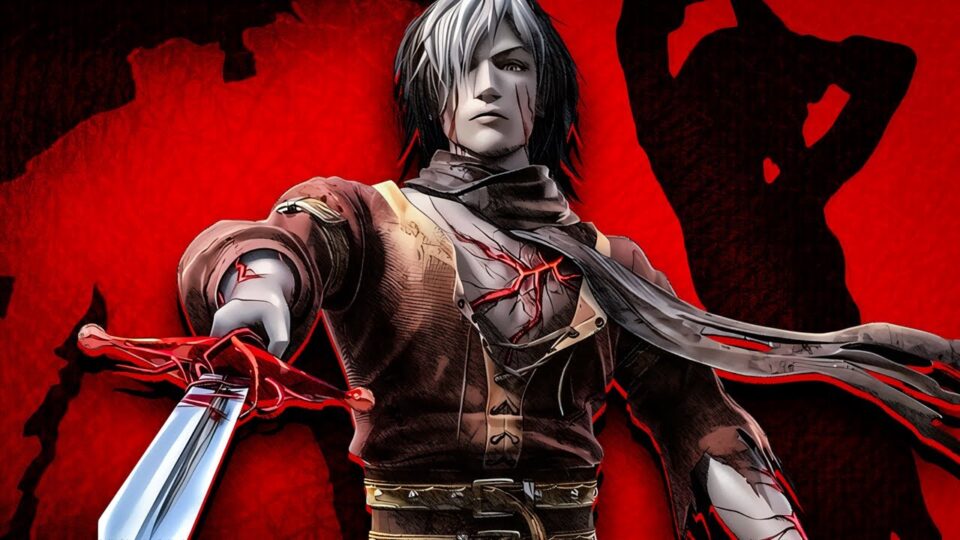
Undead Knights PSP takes a Grand Theft Auto-style idea and flips it into a hack-and-slash setting, letting players control a trio of cursed knights who fight their way through medieval battlefields by turning fallen enemies into an army of the undead. It’s a niche, sometimes overlooked corner of the PSP’s action library, but the core hook, commanding a growing horde of zombies mid-battle, gives it a personality that plenty of other beat-em-ups from the same era never bothered to try.
Game Overview and Story
Undead Knights PSP follows three former royal knights, Zeed, Rekka, and Nefaria, who were executed for treason and dragged back from the afterlife by a demonic entity known as the Beast. In exchange for a second chance at life, the trio agrees to serve the Beast’s will, hunting down enemies across a war-torn kingdom while slowly discovering how much of their humanity survived the resurrection. The tone leans dark and a little campy, with the game’s own epilogue having the three knights accept that their punishment for their sins is to keep serving as undead soldiers, which sets the stage well for a story that doesn’t take itself too seriously while still landing a few genuinely grim moments.

The signature mechanic in Undead Knights PSP is what separates it from a standard hack-and-slash. Every enemy killed on the battlefield can be raised as an undead soldier under the player’s command, and those zombie troops then fight alongside the active knight, swarm enemy formations, and can even be sacrificed for special abilities when things get desperate. Managing that undead horde well turns individual battles into small-scale strategy encounters layered on top of straightforward hack-and-slash combat, and the game leans into large-scale battlefield chaos rather than tight arena fights, throwing dozens of enemies and undead allies onto the screen at once.
Structurally, the campaign spans twenty levels playable across three difficulty settings and with each of the three knights individually, giving Undead Knights PSP a surprising amount of replay value packed into a fairly compact game. Multiplayer modes round out the package further, letting players compete or cooperate using their undead armies rather than just their own combat skills. It’s a game built around one strong idea executed across a lot of content, rather than a sprawling world or a long single story, which suits the pick-up-and-play pace a phone naturally encourages.
| Category | Details |
|---|---|
| Developer | Team Tachyon and Now Production |
| Publisher | Tecmo |
| Genre | Action-adventure, hack and slash |
| Original PSP release | September 29, 2009 (NA) |
| RAM needed for emulation | 2GB minimum, 3GB or more recommended |
| Android OS version | Android 8.0 or newer recommended |
| Storage space | Roughly 500MB to 900MB depending on the game file used |
System Needs and Compatible Phones
Undead Knights PSP can get demanding during its bigger battlefield moments, since the game is regularly rendering dozens of enemies and undead allies on screen at the same time, which puts more strain on emulation than a typical one-on-one fighting game would. On a budget phone with a MediaTek Helio G-series chip and 3GB of RAM, the game runs, but the largest battles with a full undead horde active can cause noticeable frame dips until settings are adjusted.
Mid-range phones handle Undead Knights PSP comfortably. A Snapdragon 680 or 695, or a Dimensity 700-series chip, paired with 6GB of RAM, keeps large battlefield sequences moving steadily, even with a sizable undead army summoned and multiple enemy waves on screen at once. This tier gives enough headroom to raise the internal resolution above the PSP’s native output without reintroducing the slowdown a budget phone might run into.

Flagship phones running a Snapdragon 8-series or Apple A-series chip handle the largest battles without any compromise, holding a steady frame rate through even the most crowded encounters while pushing resolution and texture quality well past what the original PSP hardware could ever display. This tier essentially removes the performance ceiling entirely, letting the chaotic horde battles run exactly as intended.
Because Undead Knights PSP frequently needs to track large numbers of active units, CPU performance again outweighs core count here, and single-core speed remains the deciding factor for how smoothly PPSSPP’s interpreter can keep up. A phone with fewer, faster cores will generally handle the busiest battlefield scenes better than one with more, slower cores.
Gameplay Mechanics and Controls
The default control layout in Undead Knights PSP works reasonably well on a touchscreen once button size and placement are adjusted, though a Bluetooth controller makes managing combos and undead commands considerably easier during hectic battles. The left stick or D-pad handles movement, the face buttons cover light attacks, heavy attacks, and jumping, and the shoulder buttons handle special moves along with commands for directing the undead horde currently under the player’s control.
Combat revolves around building up an undead army as the fight progresses, since every kill adds a potential new soldier to the player’s side. Managing that horde effectively, sending them to swarm a group of enemies, holding them back to protect a vulnerable flank, or sacrificing a portion of them for a burst ability, matters just as much as landing combo strings with the active knight. Each of the three playable knights, Zeed, Rekka, and Nefaria, has a distinct combat style and set of special moves, so switching between them across playthroughs changes how battles play out considerably.
A few tips help with the learning curve. Don’t spend the undead horde too aggressively early in a level, since holding a reserve of soldiers makes the later, larger waves in each stage far more manageable. Learn each knight’s sacrifice-based special ability, since these often turn a losing battlefield situation around faster than straightforward combos can. And since Undead Knights PSP is built around replaying levels across different difficulties and characters, don’t feel pressured to fully master every mechanic on a first run, since later playthroughs naturally deepen understanding of the horde-management system.
Technical Performance and Lag Fixes
Because Undead Knights PSP regularly renders large numbers of units at once, most performance issues trace back to a handful of PPSSPP settings not being tuned for that kind of battlefield load.
Stuttering during large battles with a full undead horde active: Lower the rendering resolution one notch below the phone’s native screen resolution, since large-scale battles with dozens of units on screen are the single biggest source of frame drops in this game. Switching to “Buffered Rendering” instead of “Skip Buffer Effects” also smooths out sudden dips when the horde and enemy waves collide.
Audio crackling or falling out of sync: Raise the audio buffer size or switch off “Low Latency” audio mode, which resolves crackling on most budget and mid-range devices, particularly during the busiest combat audio moments. If cutscene dialogue drifts out of sync, a low frame-skip value of 1 or 2 typically corrects it.
Overheating during longer sessions: Tracking large numbers of undead units keeps the CPU under sustained load, so capping the frame rate at 30 instead of 60 meaningfully reduces heat buildup during extended play sessions. Closing background apps before launching Undead Knights PSP frees up thermal headroom the chipset needs to keep unit-heavy battles steady.
Black screen or crash when loading a new level: Switching the graphics backend between Vulkan, OpenGL, and Direct3D in PPSSPP’s settings resolves this on most Android chipsets, since some devices handle one backend noticeably better than the others. Clearing the game’s cache through the emulator’s own settings menu, rather than reinstalling anything, fixes the majority of these reports without losing saved progress.
General slowdown across battles: Confirm the CPU clock setting is left on “Automatic” and that the JIT compiler is enabled rather than the older interpreter mode, since interpreter mode struggles considerably with unit-heavy scenes like the ones this game regularly produces. Between correct JIT settings and a sensible resolution choice, most performance complaints around Undead Knights PSP clear up in a single settings pass.
Conclusion
Undead Knights PSP earns its place among the more distinctive action games on the platform by building its entire combat loop around commanding a growing undead army rather than relying purely on individual combos, giving it a strategic layer most hack-and-slash titles from the same era skipped entirely. Twenty levels across three difficulties and three playable knights give it a surprising amount of content for a game that’s easy to underestimate at a glance, and the dark, slightly campy story of three cursed knights working off their sins gives just enough narrative hook to carry players through. On the hardware side, this is one of the more demanding PSP titles to emulate because of how many units it tracks during its bigger battles, but mid-range and flagship phones handle it without real compromise, and even budget devices manage it fine once settings are tuned properly.
For anyone hitting stutter, audio drift, overheating, or black screens, the fixes above resolve the overwhelming majority of reported issues, and a single pass through the resolution, audio, and JIT settings typically clears up everything at once. With a properly configured emulator, Undead Knights PSP delivers a genuinely unique horde-management hack-and-slash experience that still holds up as one of the more creative ideas the PSP’s action library produced.
⚡ Get Game And Set Up On Your Device